How to Convert Unicode to Preeti Font Online
Want to change Nepali Unicode text into Preeti font? Learn how to convert, copy, and use traditional Preeti text with this simple online guide.
Convert Unicode to Preeti →Nepali typing is an important part of digital communication in Nepal. People use Nepali text for official documents, school assignments, business letters, publications, notices, and personal messages. However, different applications and organizations may use different Nepali typing formats.
Unicode and Preeti are two commonly encountered formats in Nepali digital typing. Unicode is the standard text encoding used by modern computers and websites, while Preeti is a traditional legacy Nepali font that has been widely used in documents and desktop publishing.
If you have Nepali text written in Unicode but need to use it in a document that requires Preeti font, you can use a Unicode to Preeti converter.
In this beginner-friendly guide, you will learn how to convert Unicode to Preeti online, use the WriteNepali.com converter, understand the difference between the two formats, and solve common conversion problems.
Quick Answer: How to Convert Unicode to Preeti
- Open the Unicode to Preeti Converter.
- Copy or type your Nepali Unicode text.
- Paste it into the input box.
- Click Convert to Preeti.
- Review the converted output.
- Click Copy Preeti Text to copy the result.
- Paste it into a compatible application and select the Preeti font.
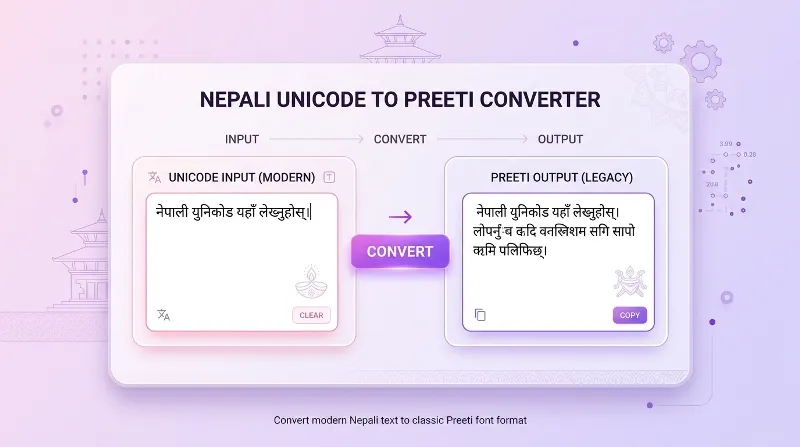
What Is Unicode to Preeti Conversion?
Unicode to Preeti conversion means changing standard Nepali Unicode text into the legacy character encoding used by the Preeti font.
Unicode stores Nepali characters as standardized text characters. It allows Nepali text to be displayed across compatible websites, applications, computers, and mobile devices without depending on one particular font encoding.
Preeti is different. It is a legacy Nepali font system that uses specific keyboard and character mappings. Text converted for Preeti must generally be displayed using the Preeti font in a compatible application.
For example, you may write a paragraph in Nepali Unicode on a website but need to prepare a document using the traditional Preeti font. A converter helps transform the text into a format intended for that font.
Unicode Text
Standard Nepali text that can be used in compatible modern applications and websites.
Preeti Text
Legacy Nepali encoded text intended to be displayed with the Preeti font in compatible applications.
How to Convert Unicode to Preeti Online
Using the WriteNepali.com Unicode to Preeti Converter is simple. You do not need to manually change every character or install a desktop conversion application to use the online tool.
Open the Unicode to Preeti Converter
Visit the Unicode to Preeti Converter page on WriteNepali.com. You will find the text input and conversion controls on the tool page.
Prepare Your Nepali Unicode Text
Write your Nepali text using a Unicode keyboard or copy it from an existing document, website, or message. Make sure the original text is actually Unicode Nepali.
Paste Text into the Input Box
Find the Input Unicode Text field on the converter page. Paste your copied Nepali text into the input area. You can also type or edit the text before converting it.
Click Convert to Preeti
After entering your Unicode text, click the Convert to Preeti (प्रीतिमा बदल्नुहोस्) button. The converter processes the input and displays the converted text in the output area.
Review the Preeti Output
Check the converted result. If possible, copy a short portion and test it in a compatible document editor with the Preeti font selected.
Copy Your Converted Text
Click the Copy Preeti Text (कपी गर्नुहोस्) button to copy the output. You can then paste it into a supported desktop application or document.
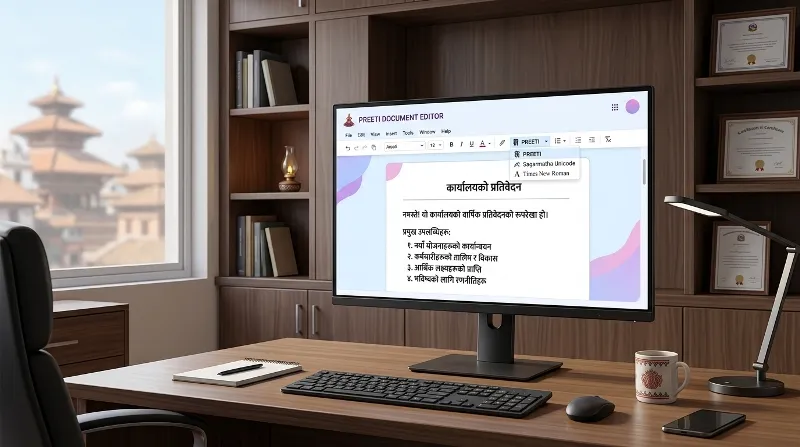
How to Use Converted Preeti Text in Microsoft Word
After converting Unicode text into Preeti format, you may want to use it in Microsoft Word or another desktop document editor.
- Open the Unicode to Preeti Converter.
- Enter your Nepali Unicode text and convert it.
- Copy the converted Preeti output.
- Open Microsoft Word or a compatible document editor.
- Paste the copied Preeti text into your document.
- Select the pasted text.
- Choose the Preeti font from the font selection menu.
- Review the displayed text and correct any conversion issues.
If Preeti is not available in your font list, you may need to install a legitimate copy of the font on your computer. Follow your operating system’s font installation instructions.
What Is the Difference Between Unicode and Preeti?
Unicode and Preeti are not simply two different visual styles of the same text. They use different approaches to representing Nepali characters.
| Feature | Unicode | Preeti |
|---|---|---|
| Type | Standard character encoding | Legacy font and encoding system |
| Compatibility | Widely supported by modern systems | Requires compatible Preeti font support |
| Website use | Suitable for modern websites | Not generally suitable as standard web text |
| Searchability | Nepali words can be indexed as Unicode text | Legacy encoded text may not be understood as Nepali words |
| Typical use | Websites, messaging, modern documents | Legacy documents and compatible desktop workflows |
| Font dependency | Uses compatible Unicode fonts | Requires the Preeti font to display correctly |
Why Do People Convert Unicode to Preeti?
1. Preparing Traditional Nepali Documents
Some existing office and document workflows use Preeti font. If a document template expects Preeti text, converting Unicode content can make it easier to prepare the document in that format.
2. Working With Older Office Files
Older Nepali documents may use legacy font-based text. People who work with such files may need compatible text formats to maintain or update their documents.
3. Creating Nepali Reports and Letters
Some users prefer or are required to use Preeti in particular desktop document templates. A converter can help transform already-written Unicode content into a Preeti-compatible format.
4. Supporting Printing and Desktop Publishing
Some older printing and publishing workflows may depend on Preeti. Converting text can help when preparing material for those specific workflows.
5. Reusing Existing Nepali Content
If you have already written content in Unicode, you may not want to type the same paragraphs again using a legacy typing method. Conversion provides a faster starting point.
6. Working With Educational Materials
Students, teachers, and educational institutions may encounter documents prepared using older Nepali fonts. Unicode to Preeti conversion can help when a particular assignment or document format requires Preeti.
Can You Convert Preeti Back to Unicode?
Yes. You can convert legacy Preeti text back into standard Nepali Unicode using a Preeti to Unicode converter.
This is useful when you receive an older Nepali document or copied text that appears incorrectly in a modern application. A reverse converter can help transform compatible Preeti text into readable Unicode Nepali.
Preeti to Unicode Converter
Have Preeti text and want to convert it into standard Unicode Nepali? Use the reverse converter.
Open Preeti to Unicode Converter →Common Problems During Unicode to Preeti Conversion
1. Converted Text Looks Like Random English Characters
This can be normal when legacy Preeti-encoded output is viewed without the Preeti font. Select the appropriate Preeti font in a compatible document editor to see whether the text displays correctly.
2. Preeti Font Is Not Available
If your document editor does not list Preeti, the font may not be installed. Obtain a legitimate font copy and install it according to your operating system’s instructions.
3. Some Words Appear Incorrectly
Legacy font conversion depends on character mapping rules. Certain combinations, punctuation marks, special characters, or unusual text patterns may not convert exactly as expected. Review the output before using it.
4. Matras or Combined Characters Look Wrong
Nepali uses vowel signs and combined characters. Some combinations may need special handling in a legacy font mapping system. Check the converted text carefully, especially for longer paragraphs.
5. Pasted Text Does Not Display Correctly
Make sure you copied the converted output rather than the original Unicode input. Then select the Preeti font in the destination application. If the problem remains, test a short sample first.
6. Text Looks Different on Another Computer
The receiving computer may not have the required Preeti font. A legacy-font document can therefore look different across devices. Consider sharing a PDF when the recipient only needs to view the final document, while retaining an editable source file separately.
Unicode or Preeti: Which One Should You Use?
The best format depends on what you want to do with your Nepali text.
Choose Unicode For
- Websites and blog posts
- Social media messages
- Email and online communication
- Modern digital documents
- Searchable Nepali content
- Long-term text storage
Choose Preeti For
- Compatible legacy documents
- Older office templates
- Specific desktop publishing workflows
- Documents that explicitly require Preeti
- Maintaining certain existing files
For most new online content, Unicode is the better choice because it supports standardized text handling and wider compatibility. Preeti remains useful when working with specific legacy documents and applications.
Tips for Better Unicode to Preeti Results
- Start with clean and readable Unicode Nepali text.
- Check the spelling and punctuation before conversion.
- Convert a short sample first if you are working with a large document.
- Review the output for unusual characters and combined letters.
- Select the Preeti font in a compatible desktop application.
- Keep a backup of the original Unicode text.
- Test the final document on the computer where it will be used or printed.
- Use Unicode for website publishing and general online communication.
Frequently Asked Questions About Unicode to Preeti Conversion
1. What is a Unicode to Preeti converter?
A Unicode to Preeti converter changes standard Nepali Unicode text into a legacy text format intended for the Preeti font. It is useful when preparing documents that require the traditional Preeti font.
2. How can I convert Unicode to Preeti online?
Open the WriteNepali.com Unicode to Preeti Converter, paste your Nepali Unicode text into the input box, click Convert to Preeti, and copy the converted output.
3. Is Unicode to Preeti conversion free on WriteNepali.com?
You can use the Unicode to Preeti converter available on WriteNepali.com through your browser. Check the live tool page for its current features and usage details.
4. Do I need to install Preeti font before converting?
You can perform the online conversion without installing the Preeti font. However, you generally need the font installed in a compatible desktop application to display the converted legacy text correctly.
5. Why does converted Preeti text look like English characters?
Preeti uses a legacy character mapping. When its encoded output is displayed without the Preeti font, it may look like random English letters or symbols. Select the Preeti font in a compatible application.
6. Can I use converted Preeti text in Microsoft Word?
Yes. Copy the converted output into a compatible document editor, select the pasted text, and choose the Preeti font. Review the result to make sure the characters display correctly.
7. Can I convert a long Nepali paragraph into Preeti?
You can enter Nepali text into the converter, subject to any input limitations on the live tool page. For long documents, test a smaller section first and review the complete output carefully.
8. What is the difference between Unicode and Preeti?
Unicode is a standardized character encoding used for modern digital text. Preeti is a legacy Nepali font and character-mapping system that requires compatible font support for correct display.
9. Can I convert Preeti back to Unicode?
Yes. Use a Preeti to Unicode converter to transform compatible legacy Preeti text into standard Unicode Nepali. You can use the reverse converter on WriteNepali.com.
10. Does Unicode to Preeti conversion work on mobile phones?
You can open the online converter in a compatible mobile browser and perform the conversion. However, displaying or editing legacy Preeti text may depend on font support in your mobile application.
11. Why are some Nepali characters incorrect after conversion?
Legacy font mappings may handle some character combinations, punctuation, and special symbols differently. Review the converted result and correct any unsupported characters before using it.
12. Is Preeti suitable for writing Nepali websites?
Unicode is generally recommended for websites because it provides standardized text encoding and wider compatibility. Preeti is mainly useful for compatible legacy document workflows.
13. Can I copy converted Preeti text directly?
Yes. The WriteNepali.com tool provides a Copy Preeti Text button. You can use it to copy the converted output and paste it into a compatible application.
14. Does converting Unicode to Preeti change the meaning of my Nepali text?
The purpose of conversion is to preserve the original text while changing its representation for the Preeti font. However, mapping limitations can cause errors, so always review the converted result.
15. Which format is better for storing Nepali text permanently?
Unicode is generally better for long-term storage because it is standardized and supported by modern systems. Keep an original Unicode copy even when you create a Preeti version.
Explore More Nepali Font Converter Tools
WriteNepali.com provides Nepali font conversion tools to help users work with Unicode and traditional Preeti text formats.
Unicode to Preeti
Convert standard Nepali Unicode text into traditional Preeti format.
Open Unicode to Preeti →Preeti to Unicode
Convert compatible legacy Preeti text into standard Unicode Nepali.
Open Preeti to Unicode →Convert Your Nepali Unicode Text into Preeti
Whether you are preparing a traditional Nepali document, updating an older file, or working with a Preeti-based template, the Unicode to Preeti converter can make the conversion process easier.
Convert Unicode to Preeti Now →Always review converted text and keep your original Unicode copy for future use.