Preeti to Unicode Converter Guide: Convert Nepali Text Easily
Learn how to convert old Preeti font text into readable Nepali Unicode using WriteNepali.com. This beginner-friendly guide explains the conversion process, common problems, useful tips, and how to copy and reuse your converted text.
Open Preeti to Unicode Converter →Do you have an old Nepali document written in Preeti font that appears as English letters or strange symbols when you open it on another computer? Are you trying to publish Nepali content online but cannot copy the text correctly from your old document?
A Preeti to Unicode Converter can help you transform compatible Preeti-encoded text into standard Nepali Unicode. This makes it easier to reuse your Nepali writing in websites, emails, social media posts, documents, and modern applications.
WriteNepali.com provides an online Preeti to Unicode Converter with a text input area, conversion button, Unicode output area, copy option, and clear option.
In this guide, you will learn how to use the converter step by step, understand the difference between Preeti and Unicode, and troubleshoot common conversion problems.
What Is a Preeti to Unicode Converter?
A Preeti to Unicode Converter is an online text conversion tool that changes text encoded using the legacy Preeti font mapping into standard Nepali Unicode characters.
Preeti has been widely used in Nepali typing, offices, printing, education, publishing, and older desktop documents. It uses a legacy character mapping in which keyboard characters are displayed as Nepali letters when the appropriate font is applied.
Because of this font-specific system, Preeti text may not display correctly when copied into a modern website or application that does not understand the original mapping.
A converter processes the compatible Preeti characters and converts them into Unicode Nepali text. You can then copy the converted text and use it in compatible digital applications.
What Is Preeti Font?
Preeti is a legacy Nepali font commonly used for typing Nepali text on computers. It has been used for office documents, letters, educational materials, newspapers, printing, and personal writing.
Unlike Unicode Nepali, Preeti relies on its own font-specific character mapping. Certain keyboard characters appear as Nepali letters when the correct Preeti font is installed and selected.
Why Does Preeti Text Look Like English?
When Preeti text is copied or opened without the correct font, the underlying characters may appear as English letters, symbols, or unexpected combinations.
This does not necessarily mean the text has disappeared. The document may still contain the original characters, but the application is displaying them using the wrong font.
Converting compatible Preeti text into Unicode can help resolve this problem by changing the legacy character mapping into standard Nepali characters.
What Is Nepali Unicode?
Nepali Unicode is a standardized way of representing Nepali text digitally. It uses Unicode characters from the Devanagari writing system rather than relying on one particular legacy font mapping.
Unicode Nepali is generally suitable for modern websites, browsers, smartphones, emails, digital documents, and compatible text editors.
Preeti Font
Uses a legacy font-specific character mapping. The text may display incorrectly if the appropriate font is unavailable.
Nepali Unicode
Uses standardized characters that can generally be displayed and processed by compatible modern applications without the original Preeti font.
Why Convert Preeti to Unicode?
1. Publish Nepali Content on Websites
Unicode Nepali is more suitable for modern website content, including blog posts, articles, educational resources, and online forms. It helps browsers and compatible text-processing systems interpret Nepali characters correctly.
2. Share Nepali Text on Social Media
Unicode text can generally be copied into Facebook posts, captions, comments, messaging applications, and other platforms that support Nepali characters.
3. Edit Old Word Documents
If you have older Word documents written using Preeti, converting the text can make it easier to reuse the content in modern word-processing software.
4. Prepare Office Letters and Reports
Organizations and office employees may need to update older Nepali documents. Unicode conversion can help make the text easier to edit, search, and share.
5. Reuse Educational Materials
Students and teachers can convert compatible Preeti notes, assignments, questions, and learning materials into Unicode for use in modern documents and digital learning platforms.
6. Improve Nepali Text Searchability
Properly encoded Unicode text can generally be searched and processed more reliably than legacy text that appears as unrelated Latin characters to an application or search system.
How to Use the Preeti to Unicode Converter on WriteNepali.com
Follow these simple steps to convert your Preeti text into Nepali Unicode.
Step 1: Open the Online Converter
Visit the official WriteNepali.com converter page:
Preeti to Unicode Converter – WriteNepali.com
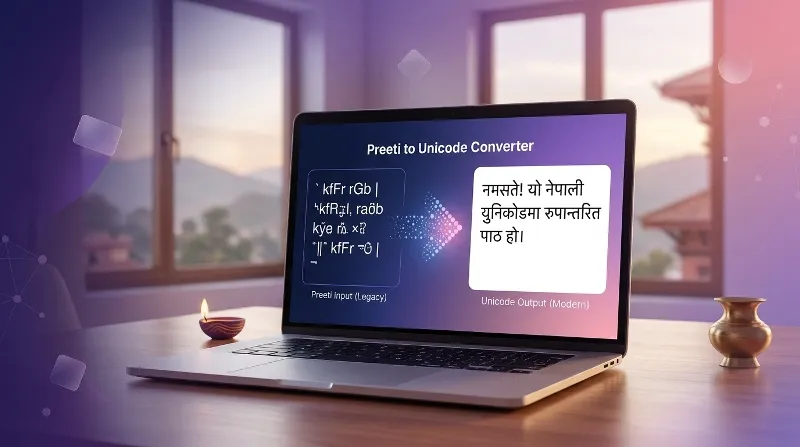
You will find the Preeti text input area and the conversion controls on the page.
Step 2: Copy Your Original Preeti Text
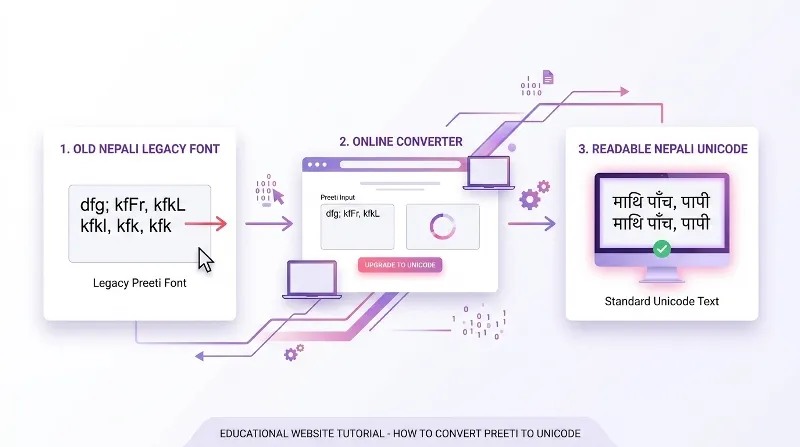
Open the document or application that contains your original Preeti text.
- Select the Nepali text you want to convert.
- Copy the selected text using your computer’s copy command or keyboard shortcut.
- If you are working with a Word document, select the actual text rather than copying a screenshot or image.
If your document contains tables, columns, or complicated formatting, begin with a short paragraph to check the conversion quality.
Step 3: Paste Preeti Text Into the Input Box
Return to the converter page and paste your copied Preeti text into the top input area labeled Paste Preeti Text Here.
Make sure the source text was originally typed using Preeti. Other legacy Nepali fonts may use different character mappings and may not convert correctly with a Preeti converter.
Step 4: Click Convert to Unicode
After pasting your text, click the Convert to Unicode button.
The converter processes the input and displays the converted Nepali text in the output area below.
Step 5: Review the Converted Unicode Text
Read the converted output carefully before using it. Check the spelling, vowel signs, conjunct characters, punctuation, and sentence structure.
Conversion tools process character mappings. They do not necessarily understand the meaning of every sentence, so proofreading is important.
Step 6: Copy the Unicode Output
Once you are satisfied with the result, click Copy Unicode Text to copy the converted text.
You can then paste the Unicode text into a Word document, website, email, social media post, or another compatible application.
Step 7: Clear the Converter When Needed
If you want to convert another text passage, use the Clear All button to clear the existing input and output. Then paste your next Preeti text and repeat the conversion process.
Ready to Convert Your Nepali Text?
Use the WriteNepali online tool to convert compatible Preeti text into Nepali Unicode.
Open Preeti to Unicode ConverterPreeti to Unicode Conversion Examples and Use Cases
People convert Preeti text for many different purposes. The following examples explain how the conversion process can help with everyday Nepali digital writing.
Example 1: Converting an Old Nepali Greeting
You may have a greeting or personal message saved in a document that uses Preeti. After converting the text into Unicode and proofreading it, you can reuse the message in a compatible messaging application or social media post.
Example 2: Converting an Office Letter
An office employee may receive an older Nepali letter written using Preeti. Converting the text can make it easier to edit the letter in a modern word processor. The original formatting may still need to be recreated.
Example 3: Publishing an Old Nepali Article
A blogger may want to reuse an article originally typed using Preeti. Unicode conversion can make the text more suitable for a modern website or content management system.
Example 4: Updating Educational Notes
Students and teachers may have old notes, questions, or study materials saved in Preeti. Converting compatible text allows them to reuse the material in current documents and online learning resources.
Example 5: Updating Newspaper or Publishing Text
Publishers and designers may need to move old Nepali text into a modern editing or publishing workflow. Conversion can help with the text itself, but page layout, typography, and formatting may require separate adjustments.
Common Preeti to Unicode Conversion Problems
Although a converter can save time, some text may require additional checking. Here are common problems and ways to address them.
1. The Output Contains Incorrect Characters
This may happen if the original document uses a different legacy Nepali font rather than Preeti.
- Confirm that the source text was created using Preeti.
- Try converting a small sample first.
- If the output remains incorrect, look for a converter designed for the original font.
2. Some Nepali Words Have Spelling Errors
A converter maps character sequences, but it does not automatically understand the intended meaning of every word.
Original typing mistakes may remain, and ambiguous character combinations may produce unexpected output. Proofread the converted text before publishing or sharing it.
3. Vowel Signs or Conjunct Characters Look Wrong
Devanagari writing includes vowel signs and combined characters that may require special handling during conversion.
If a word looks incorrect, compare it with the original document and manually correct the output when necessary.
4. Document Formatting Changes
Text converters usually focus on character conversion rather than complete document layout.
Tables, columns, page breaks, bold text, indentation, and spacing may need to be adjusted separately in your destination application.
5. Unicode Text Does Not Display Correctly
If the converted text still looks incorrect, check whether the destination application supports Nepali Unicode and Devanagari characters.
Try pasting the output into a modern Unicode-compatible text editor to determine whether the problem is caused by the converter or the destination application.
6. The Nepali Text Is Inside an Image
A normal font converter works with text, not screenshots or scanned pages.
If your Nepali document is an image, you may need Optical Character Recognition (OCR) software to extract the text before using a font conversion workflow. OCR results also require proofreading.
Preeti vs Unicode: Key Differences
| Feature | Preeti Font | Nepali Unicode |
|---|---|---|
| Encoding approach | Legacy font-specific mapping | Standardized Unicode characters |
| Font dependency | May require the original Preeti font | Generally works with compatible Unicode fonts |
| Modern websites | May need conversion first | Generally suitable for online publishing |
| Copy and paste | May display incorrectly across applications | Generally more compatible across modern applications |
| Searchability | Can be difficult if interpreted as legacy characters | Generally easier for compatible text search systems |
| Best use | Working with existing legacy documents | Creating and sharing new Nepali digital content |
For new Nepali digital content, Unicode is generally the more practical choice. However, Preeti remains useful when working with existing legacy documents and established workflows.
Who Should Use a Preeti to Unicode Converter?
Students and Teachers
Convert compatible Nepali notes, educational materials, questions, and assignments for modern digital use.
Office Employees
Reuse old letters, reports, and administrative documents in current word-processing applications.
Bloggers and Writers
Prepare legacy Nepali text for website articles, blog posts, and digital publishing.
Publishers and Designers
Move compatible legacy text into modern publishing and editing workflows.
Tips for Accurate Preeti to Unicode Conversion
- Confirm the original font: Make sure the source text was typed using Preeti.
- Test a short passage: Convert a small sample before processing a long document.
- Keep the original file: Preserve an untouched copy for comparison.
- Proofread names and numbers: Pay special attention to names, dates, addresses, and official information.
- Check vowel signs and conjuncts: Review complex Nepali words carefully.
- Use Unicode-compatible software: Paste the result into an application that supports Devanagari.
- Recheck official documents: Verify converted content before submitting important documents.
- Separate text conversion from formatting: Recreate document layout when necessary.
- Protect confidential information: Avoid pasting sensitive personal or business information into online tools unless you understand their privacy practices.
Frequently Asked Questions About Preeti to Unicode Conversion
1. What is a Preeti to Unicode Converter?
A Preeti to Unicode Converter changes text encoded using the legacy Preeti font mapping into standard Nepali Unicode characters. It helps make compatible Nepali text easier to reuse in modern documents, websites, and applications.
2. How do I convert Preeti text into Nepali Unicode online?
Open the WriteNepali converter, paste your Preeti text into the input box, click Convert to Unicode, review the output, and use Copy Unicode Text to copy the result.
3. Is Preeti the same as Nepali Unicode?
No. Preeti is a legacy font-specific mapping, while Unicode is a standardized character-encoding system. Preeti text may depend on a particular font to display correctly.
4. Why does my Preeti text look like English letters?
Legacy Preeti text may contain Latin keyboard characters that appear as Nepali only when the correct Preeti font is applied. Without the font, the underlying characters may be displayed instead.
5. Can I convert a complete Word document?
This depends on the converter’s input limits and the structure of your document. For long documents, convert smaller sections and review the output before using it in the final file.
6. Can I use converted Unicode Nepali text on Facebook?
Yes. Unicode Nepali text can generally be copied into Facebook posts, comments, captions, and messages. Check the converted text before publishing.
7. Can I use Unicode Nepali on my website?
Yes. Unicode is generally suitable for Nepali website content and modern content management systems. Your website and database should support Unicode correctly.
8. Does converting Preeti to Unicode preserve document formatting?
Not necessarily. Most converters focus on character conversion. Tables, columns, bold formatting, indentation, spacing, and page layout may need to be adjusted separately.
9. Why does the converted text contain spelling mistakes?
Mistakes may come from the original document, unsupported character combinations, a different source font, or limitations in the conversion mapping. Proofread and correct the result manually.
10. Can I convert Kantipur or other Nepali legacy fonts using a Preeti converter?
Not always. Different legacy Nepali fonts may use different character mappings. Use a converter designed for the original font for better results.
11. Do I need to install Preeti on my computer?
You may need the Preeti font to display or copy the original text correctly in some applications. Properly converted Unicode text generally does not require the original Preeti font.
12. Can I use the converter on a mobile phone?
You can try the browser-based converter on a compatible smartphone. Paste your original text, convert it, and copy the Unicode output. Mobile compatibility depends on your device and browser.
13. Can I convert Unicode text back to Preeti?
Yes. A separate Unicode to Preeti converter can perform the reverse conversion. Some characters may not map perfectly, so review the converted text before using it.
14. Can I convert text from a scanned Nepali document?
A font converter normally cannot extract text directly from a scanned page or image. You may need OCR software to extract the text first, then proofread it before conversion.
15. Is Unicode better than Preeti for new Nepali content?
Unicode is generally preferable for new digital content because it uses standardized character encoding and is broadly compatible with modern devices and applications.
16. Is the WriteNepali Preeti to Unicode Converter free?
Please check the current converter page for its latest access conditions: Preeti to Unicode Converter.
17. Can I use converted text for official Nepali documents?
You can use converted text as a starting point, but carefully verify names, dates, spelling, and formatting. Follow the requirements of the relevant institution before submitting official documents.
18. What should I do if the converter does not work?
Confirm that your original text uses Preeti, try a short sample, and check that you pasted the text into the correct input area. If the output remains incorrect, the source may use another legacy font or an unsupported character sequence.
Conclusion
Preeti to Unicode conversion is useful for people who need to reuse Nepali text from older documents in modern digital environments. Although Preeti has been used for many years in offices, education, publishing, and personal documents, its legacy font mapping can create compatibility problems when text is copied between applications.
Unicode provides a standardized way to represent Nepali characters and is generally more suitable for modern websites, digital documents, messaging applications, and online publishing.
With the Preeti to Unicode Converter on WriteNepali.com, you can paste compatible Preeti text, convert it, review the result, and copy the Unicode output for use in another application.
For the best results, confirm that your source uses Preeti, keep the original document, and proofread the converted text carefully. This simple process can help you reuse legacy Nepali writing while making it more compatible with modern digital workflows.
Convert Your Preeti Text Into Unicode Today
Ready to get started? Open the WriteNepali converter and follow the steps in this guide.
Use the Preeti to Unicode Converter →