Unicode to Preeti Converter (युनिकोडबाट प्रीति)
Convert standard Nepali Unicode text into traditional Preeti font format instantly.
Unicode to Preeti Converter – Convert Nepali Text Easily
Convert Nepali Unicode text into traditional Preeti font format using the free online Unicode to Preeti Converter on WriteNepali.com. A simple way to prepare Nepali text for documents, typing projects and compatible applications.
What Is a Unicode to Preeti Converter?
A Unicode to Preeti Converter is an online tool that changes Nepali text written in Unicode into the Preeti font format. It helps users who receive or create Nepali content in Unicode but need to work with the traditional Preeti font system.
Nepali Unicode is a standard way of representing Nepali characters digitally. It is commonly used on websites, smartphones, social media platforms and modern applications. Preeti, on the other hand, is a widely recognized traditional Nepali font used in many older documents and office workflows.
These two systems do not store Nepali text in the same way. Simply changing the font name of Unicode text to Preeti usually does not produce the correct result. The text needs to be converted into the corresponding Preeti character format.
WriteNepali.com provides an online Unicode to Preeti Converter to make this process easier. Enter your Nepali Unicode text, convert it and copy the generated output for use in a compatible application.
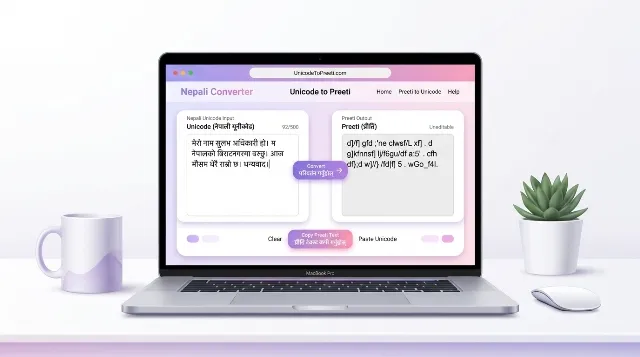
How to Convert Unicode to Preeti Online
You can use the converter directly on this page. You do not need to install a desktop application just to access the online conversion interface.
- Open the converter: Find the Unicode to Preeti Converter at the top of this page.
- Enter Unicode text: Type or paste your Nepali Unicode text into the input field.
- Start conversion: Click the Convert to Preeti button.
- Check the output: Review the converted Preeti text in the output area.
- Copy your text: Use the Copy Preeti Text button to copy the result.
- Use a compatible application: Paste the converted text into an application that supports the Preeti font and select the appropriate font if necessary.
Unicode Font vs Preeti Font: What Is the Difference?
Unicode and Preeti are different approaches to representing Nepali text. Understanding the difference helps you choose the correct format for your document or project.
Nepali Unicode
Unicode is a universal character encoding standard. Nepali Unicode text can generally be displayed across supported devices and applications without requiring a specific legacy Nepali font. It is suitable for websites, search engines, messaging and modern digital publishing.
Preeti Font
Preeti is a traditional Nepali font that uses its own character mapping. It is commonly encountered in older Nepali documents and certain office workflows. A compatible Preeti font is generally needed to display its converted text correctly.
Quick Comparison
- Unicode: Standardized character encoding for Nepali text.
- Preeti: Legacy font-based character mapping.
- Unicode use: Websites, mobile devices and modern applications.
- Preeti use: Compatible legacy documents and traditional typing workflows.
- Conversion: Requires character mapping rather than simply changing the font family.
Why Use an Online Unicode to Preeti Converter?
Many people still need Preeti-formatted Nepali text for documents, forms, educational materials and office-related work. Converting text online can save time when you do not want to manually retype the same content.
Use the converter from a supported web browser without installing a separate conversion program.
Convert existing Unicode text instead of manually typing the content again.
Copy the generated Preeti text and paste it into a compatible application.
Prepare text for compatible office documents, forms and legacy typing workflows.
Where Can You Use Converted Preeti Text?
Converted Preeti text can be useful in different situations where a legacy Nepali font format is required.
- Office documents: Preparing Nepali text for compatible Word documents.
- Educational materials: Working with older school or college documents that use Preeti.
- Typing projects: Preparing text for traditional Nepali typing workflows.
- Forms and reports: Using converted text in compatible document templates.
- Printing: Preparing legacy-format Nepali text for documents that require Preeti.
- Document editing: Updating older files that use the Preeti font system.
Remember that the destination application must support the Preeti font. If the font is unavailable, the converted output may not look like readable Nepali text.
Tips for Better Unicode to Preeti Conversion
- Start with correctly written Nepali Unicode text.
- Check spelling and punctuation before converting.
- Copy the complete output after conversion.
- Use a compatible Preeti font in your destination application.
- Check conjunct characters, vowel signs and special symbols carefully.
- Review the final document before printing or submitting it.
- Keep an original Unicode copy so you can edit the text later.
Common Unicode to Preeti Conversion Problems
Converted text looks like English letters
This is normal for many legacy font encodings. Preeti output may contain Latin characters that represent Nepali glyphs. Select a compatible Preeti font in the application where you paste the text.
Some Nepali characters look incorrect
Complex character combinations, vowel signs and special symbols may need careful checking. If a character does not appear correctly, review the original Unicode input and the converted output.
Text looks different after pasting
The destination application may not have the required font selected or installed. Check the font setting and make sure the application supports the Preeti font.
Formatting changes after conversion
Text conversion does not necessarily preserve the original document’s complete layout, font size, spacing, tables or formatting. Review and adjust the destination document separately.
Is Unicode to Preeti Conversion the Same as Changing a Font?
No. Changing the font family and converting the underlying text are different operations. Unicode text uses standardized character codes, while Preeti uses a legacy character mapping. Applying the Preeti font directly to Unicode text generally does not perform the required character conversion.
Use the converter first, then display the resulting text with a compatible Preeti font. This two-step process is important for obtaining the intended Nepali characters.
Who Can Benefit from This Nepali Font Converter?
The Unicode to Preeti Converter may be useful for:
- Nepali students and teachers working with older documents.
- Office staff preparing legacy Nepali files.
- Writers and editors handling Preeti-formatted content.
- Typists working with traditional Nepali font workflows.
- Businesses and organizations maintaining older Nepali records.
- People who need to move Nepali text from modern Unicode sources into Preeti-compatible applications.
Frequently Asked Questions (FAQs)
1. What is a Unicode to Preeti Converter?
It is a tool that converts Nepali text written in Unicode into the character format used by the traditional Preeti font system.
2. How can I convert Unicode to Preeti online?
Enter or paste your Nepali Unicode text into the converter, click Convert to Preeti, review the output and copy the converted text.
3. Is the Unicode to Preeti Converter free?
You can use the online converter on this page without purchasing a separate desktop conversion program. Check the website for any updated usage terms.
4. Do I need to install the Preeti font?
You may need a compatible Preeti font installed in the application where you want to display the converted output. The converter itself works in your web browser.
5. Why does my converted text look like English letters?
Preeti uses a legacy character mapping. Its underlying output may look like Latin letters until it is displayed using the compatible Preeti font.
6. Can I use converted Preeti text in Microsoft Word?
Yes, you can paste the converted text into a compatible Word document and select the Preeti font. Check the document to ensure the characters display correctly.
7. Can I convert a long Nepali paragraph?
You can enter text into the converter, but the amount of text supported may depend on the tool’s current input limits. For long documents, convert and review manageable sections.
8. Does changing Unicode text to the Preeti font convert it?
No. Simply changing the font name does not convert Unicode character codes into Preeti encoding. You need a proper text conversion process.
9. Will the converter preserve document formatting?
The converter changes text format, not necessarily the complete document layout. You may need to adjust font size, spacing, tables and other formatting separately.
10. Can I copy the converted Preeti text?
Yes. After conversion, use the Copy Preeti Text button to copy the output and paste it into a compatible application.
11. Can I use this converter on a mobile phone?
You can open the online converter in a supported mobile browser. The appearance of Preeti text on your phone may depend on font and application support.
12. Is Preeti the same as Nepali Unicode?
No. Unicode is a standardized character encoding system, whereas Preeti is a traditional Nepali font with its own character mapping.
13. Why do some characters appear incorrectly?
Some character combinations or symbols may not convert or display as expected. Check the input, output and destination font before using the final text.
14. Can I use converted text for official documents?
You can prepare text for compatible documents, but always verify the characters, formatting and document requirements before submitting an official file.
15. Is an internet connection required?
You need an internet connection to open and use the online converter page. The destination application may work offline once you have copied the converted text and have the required font available.
Convert Nepali Unicode to Preeti with WriteNepali.com
Need to prepare Nepali text for a traditional Preeti font document? Use the Unicode to Preeti Converter at the top of this page. Enter your text, convert it and copy the result for use in a compatible application.
WriteNepali.com – Helpful online tools for Nepali users.